
have you ever searched on Google – best ERP software for schools ?
Ever walked into a school’s admin office during fee-collection week, you already know the chaos. One staffer is typing receipts into a legacy portal, the accountant is fighting CSV exports to reconcile Tally, parents are blowing up WhatsApp asking where Bus #4 is, and the vice principal is still shuffling paper to find a substitute for 10th-grade Math.
Most schools between 100 and 5,000 students don’t fail because of bad teaching. They get bogged down because they’re duct-taping five to seven disconnected tools together and paying separate vendors for each one.
If you were sitting across from me over coffee asking which best ERP software for schools is actually worth your budget right now, I wouldn’t hand you a generic marketing brochure. Instead, here is a straight-shooting breakdown of the top six platforms, their real trade-offs, and a transparent scoring system so you can see why each one lands where it does.
Quick Verdict
Best All-in-One Modern Operating System (100–5,000+ Students): EduOS (9.3/10) : Eliminates Tally exports with native double-entry accounting, runs bus tracking via driver phones (zero GPS hardware), and scales cleanly across branches.
Best for In-House IT & Transparent Pricing: Fedena (8.4/10) : Open-source roots, published pricing tiers, and 50+ modular features.
Best Legacy Pick for Traditional CBSE Schools: Entab CampusCare (8.1/10) : 25+ years of deep CBSE administrative workflows.
How I Rated These School ERPs (No Made-Up Scores)
Most software roundups slap a random “9.8/10” on whoever pays the highest affiliate commission. That helps nobody.
To keep this logical, every platform below is graded out of 10 using five weighted criteria that actually impact a school’s bank account and sanity:
-
Operational Unification & Finance Depth (25%): Does it handle real accounting, or is it just a glorified receipt printer that forces you back into Tally?
-
Total Cost of Ownership & Hardware Overhead (20%): Are you getting hit with hidden bills for GPS black boxes, SIM cards, SMS packs, and separate CRM tools?
-
Ease of Use & Staff Adoption (20%): Can your least tech-savvy teacher mark attendance in 30 seconds without calling IT?
-
Scalability from 100 to 5,000 Students (20%): Does the architecture hold up when you double enrollment or open a second campus?
-
Deployment Speed & Support (15%): Does onboarding take a week or an entire semester?
Quick Comparison: Best School ERP Software at a Glance
| School ERP | Best For | Ideal Student Size | Native Double-Entry Accounting? | Hardware-Free Bus GPS? | Logical Rating |
| EduOS | Replacing 5+ vendors with one unified OS | 100 – 10,000+ (Single & Multi-Campus) | Yes (Replaces Tally/QuickBooks) | Yes (Driver App) | 9.3 / 10 |
| Fedena | Schools with IT staff & modular needs | 100 – 3,000 | No (Fee logs + integrations) | No (3rd-party GPS) | 8.4 / 10 |
| Edunext | Progressive CBSE/ICSE & LMS focus | 500 – 5,000+ | No (Tally integration) | No (Hardware-based) | 8.2 / 10 |
| Entab CampusCare | Established traditional CBSE schools | 1,000 – 5,000+ | No (Fee module + exports) | No (Hardware-based) | 8.1 / 10 |
| MyClassboard | Growing private schools wanting breadth | 300 – 4,000 | No (Accounting add-ons/exports) | No (Hardware-based) | 7.9 / 10 |
| Vidyalaya ERP | Residential campuses & on-premise hosting | 500 – 5,000 | No (Standard fee/finance modules) | No (Hardware-based) | 7.7 / 10 |
Deep-Dive Reviews: The 6 Best ERP Software for Schools
1. EduOS – Best Unified Operating System for Growing & Multi-Campus Schools
Overall Rating: 9.3 / 10 (Unification: 9.8 | TCO: 9.5 | Ease of Use: 9.0 | Scalability: 9.5 | Onboarding: 8.5)
If you’re tired of paying for Tally, a separate admissions CRM, aSc Timetables, and clunky bus GPS boxes, EduOS is the sharpest modern platform I’ve seen built specifically to kill that vendor sprawl. It packs 11 core systems, from admissions and HR/PF/ESI payroll to uniform POS and multi-board report cards (CBSE, ICSE, IB), into a single multi-tenant cloud architecture.
What genuinely sets it apart from legacy ERPs are two engineering decisions that save real money. First, it has a native double-entry general ledger with a live Chart of Accounts and automated journal postings, meaning when a parent pays fees via Razorpay or Cashfree, the debit/credit entries auto-reconcile with zero manual CSV exports to Tally.Second, its Zero-Hardware Fleet Telemetry runs directly on the bus driver’s smartphone app with stop geofencing,saving roughly ₹16,000 per bus every year on GPS boxes and SIM recharges.
On top of that, qualifying schools deploying EduOS also get assisted provisioning for Canva Pro for Education, Google Workspace for Education, and Adobe for Education at zero extra platform software cost. Plus, they run a structured 4-phase rollout designed to get a campus live in about 7 days rather than dragging on for months.
Pros:
-
True Tally replacement: Native double-entry accounting, Bank Suspense Desk for NEFT/RTGS matching, and FIFO “Smart Collect” fee allocation.
-
Zero GPS hardware costs: Driver smartphone beaconing gives parents live bus radar on Android and iOS without buying black-box hardware.
-
AI Timetable & 1-Click Substitutes: Solves conflict-free schedules in minutes and assigns qualified substitutes in one click when a teacher calls in sick.
-
Built-in Admissions CRM: Tracks inquiries in a visual Kanban funnel so walk-ins and phone leads don’t slip through paper registers.
-
Multi-campus ready: Strictly isolated tenant databases with a consolidated Trustee Cockpit for owners managing 1 to 50+ branches.
Cons:
-
Custom quote pricing: Like most enterprise-grade school platforms, you need to book a briefing or use their ROI modeler rather than clicking a self-serve monthly checkout.
-
Driver-phone dependency for GPS: Because it skips dedicated vehicle hardware, transport coordinators need basic discipline around drivers keeping their phones charged and data active during routes.
-
Newer market footprint: Doesn’t have the 20-year legacy brand recognition of older on-premise vendors (though its modern codebase is precisely why it’s faster).
Best for: All schools (100 to 5,000 students) and multi-branch trusts that want to cut software/hardware bloat and finally get real-time financial visibility.
2. Fedena – Best for Transparent Pricing & Schools with In-House IT
Overall Rating: 8.4 / 10 (Unification: 8.0 | TCO: 8.5 | Ease of Use: 8.2 | Scalability: 8.8 | Onboarding: 8.5)
Fedena (built by Bengaluru-based Foradian Technologies) is one of the few school ERPs that actually publishes its pricing tiers publicly and offers a 14-day free trial. Because it started with open-source roots, it has a massive global footprint and over 50 modular add-ons covering academics, gradebooks, hostels, and multi-institution dashboards.
If you have an IT coordinator on staff who likes tweaking workflows, using public APIs, or even self-hosting a base version, Fedena gives you a level of control most closed SaaS vendors won’t touch.
Pros:
-
Transparent pricing & free trial: Published annual plans (starting around $999–$1,699/year plus Enterprise tiers) let you budget without sitting through three sales calls.
-
Modular flexibility: Start lean at 100 students and switch on hostel, library, or transport modules as you grow.
-
Developer-friendly: Offers a public API and open-source heritage for custom integrations.
Cons:
-
UI feels dated in spots: Compared to newer cloud-native platforms, some admin screens require extra clicks.
-
Not a full accounting replacement: You will still rely on external accounting software like Tally or QuickBooks for your formal balance sheet.
-
Add-ons stack up: Essential extras like custom mobile branding, SMS gateways, and third-party GPS integrations add to the base cost.
Best for: Tech-forward small and medium schools that want predictable pricing and an open API ecosystem.
3. Edunext – Best for Modern UI & Digital Learning Focus
Overall Rating: 8.2 / 10 (Unification: 8.0 | TCO: 7.8 | Ease of Use: 8.8 | Scalability: 8.5 | Onboarding: 8.0)
Launched around 2012–2013, Edunext has built a strong reputation among progressive CBSE, ICSE, and boarding schools. If your teachers and parents have struggled with clunky, 1990s-style portals in the past, Edunext’s clean, app-like interface is a breath of fresh air.
It leans heavily into the academic and digital learning side, pairing core ERP modules (admissions, fees, attendance, timetables) with a solid Learning Management System (LMS) and exam proctoring.
Pros:
-
Clean, modern interface: Younger teachers and parents pick up the mobile app quickly with minimal hand-holding.
-
Strong LMS & academic tools: Great for schools prioritizing digital assignments, online assessments, and e-learning.
-
Proven with multi-branch & boarding schools: Handles larger residential setups well.
Cons:
-
Relies on Tally integration: Rather than replacing your accounting software natively, it syncs data out to Tally.
-
Hardware-dependent transport: Live bus tracking still requires purchasing and maintaining external GPS devices.
-
Opaque pricing: No public pricing tiers or self-serve trial; requires a guided sales quote.
Best for: Mid-sized private schools (500–5,000 students) where parent app aesthetics and built-in LMS features top the priority list.
4. Entab CampusCare – Best Legacy Choice for Traditional CBSE Schools
Overall Rating: 8.1 / 10 (Unification: 8.2 | TCO: 7.5 | Ease of Use: 7.6 | Scalability: 9.0 | Onboarding: 8.0)
Entab has been in the Indian K-12 space since 2000, serving over 2,500 schools. When you talk to principals of large, established CBSE schools, CampusCare almost always comes up because they have spent 25+ years mapping out every quirky Indian school compliance rule, including CBSE report card formats, SQAAF modules, and staff appraisals.
The trade-off? You’re buying a traditional, heavy-duty administrative engine. It’s reliable, but it isn’t nimble.
Pros:
-
Deep CBSE/ICSE compliance: Decades of experience handling Indian board exam structures, marksheets, and regulatory updates.
-
Battle-tested at scale: Easily handles 2,000 to 5,000+ student campuses without breaking a sweat.
-
Broad administrative modules: Covers everything from admissions and HR to transport and academic grading.
Cons:
-
Overkill for smaller schools: A 150-student school will likely find the setup, interface, and pricing heavier than needed.
-
Slower modernization: The workflow feels more like traditional enterprise software than a snappy modern app.
-
No transparent pricing or free trial: Entirely quote-driven, and implementation can take weeks depending on customization.
Best for: Established medium-to-large CBSE schools (1,000–5,000 students) that value vendor longevity above all else.
5. MyClassboard (MCB) – Best for Broad Feature Catalogue & Parent Engagement
Overall Rating: 7.9 / 10 (Unification: 8.0 | TCO: 7.8 | Ease of Use: 8.3 | Scalability: 8.0 | Onboarding: 7.5)
Hyderabad-based MyClassboard has been around for 15+ years and serves thousands of Indian private schools. It hits a nice middle ground: it’s far more modern and parent-friendly than legacy on-premise tools, while offering a massive catalogue of modules, including admission management, gradebooks, communication, and even AI assistance for question papers.
Pros:
-
Wide feature set to grow into: You can start with basic attendance and fees and turn on advanced modules later.
-
Strong parent communication: Smooth mobile experience that keeps parents off chaotic WhatsApp groups.
-
Good fit for small-to-mid private schools: Well-tailored to the day-to-day rhythm of growing K-12 schools.
Cons:
-
Feature sprawl: Because the catalogue is so wide, admins sometimes get overwhelmed configuring modules they don’t actually use.
-
Fragmented accounting & hardware: Still requires separate accounting reconciliation and third-party hardware for GPS fleet tracking.
-
Support can vary by region: Schools outside major metro hubs occasionally report slower turnaround during peak admission/exam seasons.
Best for: Small-to-medium private schools (300–4,000 students) looking for strong parent engagement and a wide menu of academic add-ons.
6. Vidyalaya ERP – Best for Residential Campuses & On-Premise Hosting
Overall Rating: 7.7 / 10 (Unification: 7.8 | TCO: 7.5 | Ease of Use: 7.4 | Scalability: 8.2 | Onboarding: 7.5)
Built by Sapphire Software Solutions in Ahmedabad, Vidyalaya ERP has 25+ years under its belt. Its main differentiator in 2026 is flexibility in hosting: while almost everyone else forces you into the cloud, Vidyalaya still supports on-premise (own-server) hosting alongside cloud SaaS, and it has deep modules for residential/boarding schools.
Pros:
-
Cloud or on-premise choice: Ideal if your school trust has strict internal policies requiring data to sit on local campus servers.
-
Solid residential & hostel management: Handles mess, hostel rooms, and gate passes well.
-
Proven mid-range reliability: Covers all core SIS, fee, exam, and HR requirements steadily.
Cons:
-
Dated user experience: Not as intuitive or mobile-first as newer platforms like EduOS or Edunext.
-
Fewer modern automations: Lacks built-in AI timetable conflict solvers or hardware-free GPS tracking.
-
Higher IT maintenance (if on-premise): Self-hosting means you’re on the hook for local server backups, security patches, and uptime.
Best for: Residential/boarding schools and traditional trusts (500–5,000 students) that specifically want an on-premise server option.
How to Pick the Right ERP for Your School Size
A 200-student school and a 4,000-student school do not have the same headaches. Here is how I’d narrow your shortlist based on your current headcount:
Small Schools (100 – 500 Students)
-
Your biggest risk: Overpaying for bloated enterprise software and hardware you can’t maintain.
-
What to prioritize: Fast setup (under 2 weeks), zero hardware costs (skip expensive GPS boxes and biometric rigs at first), and an Admissions CRM so you convert every local inquiry.
-
Top picks: EduOS (if you want zero-hardware GPS, built-in accounting, and room to grow without switching later) or Fedena (if you want a transparent, low-cost modular starter plan).
Medium Schools (500 – 2,000 Students)
-
Your biggest risk: Revenue leakage and staff burnout. At 1,000+ students, manual Tally reconciliation and sick-leave timetable scrambles start eating 20+ hours a week.
-
What to prioritize: Automated online fee reconciliation, AI timetable/substitute management, and a slick parent mobile app.
-
Top picks: EduOS (best for unifying finance, fleet, and academics) or Edunext / MyClassboard (if digital LMS tools are your #1 focus).
Large & Multi-Campus Schools (2,000 – 5,000+ Students)
-
Your biggest risk: Blind governance. Trustees shouldn’t have to wait until Friday evening for branch accountants to email Excel sheets just to know total fee collection.
-
What to prioritize: Strict multi-tenant database isolation, role-based access control (RBAC) with tamper-proof audit logs, and a consolidated group dashboard.
-
Top picks: EduOS (built from the ground up with isolated tenant databases and a live Trustee Cockpit) or Entab CampusCare (if you are a legacy CBSE group already invested in traditional workflows).
3 Questions to Ask Before You Sign Any School ERP Contract
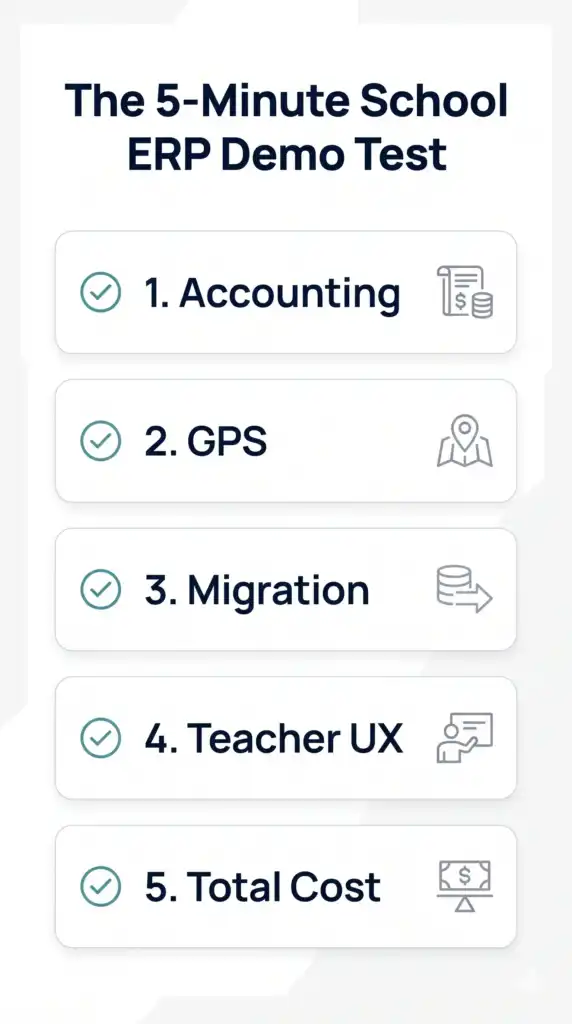
Before you hand over a cheque, ask every vendor these three questions during your demo:
-
“Show me what happens when a parent pays ₹50,000 via NEFT—does it auto-post to a balanced Trial Balance, or do we still export CSVs to Tally?” Watch how quickly most sales reps get quiet on this one.
-
“Give me the real Year-1 total cost, including SMS packs, payment gateway fees, GPS hardware, SIM cards, and data migration.” The cheapest per-student license often becomes the most expensive once add-ons kick in.
-
“Can our least tech-savvy teacher mark attendance and upload exam marks in under 2 minutes without training?” If the software requires a 40-page manual, your staff will quietly go back to paper registers within a month.
read about : NEP2020 Holistic Progress Card (HPC) guidelines from NCERT/CBSE

Frequently Asked Questions for Best ERP Software for Schools (People Also Ask)
How much does school ERP software cost for small and medium schools?
Most cloud school ERPs charge between ₹15 to ₹60 per student per month (roughly ₹150–₹600 per student annually),depending on the modules you pick. Always ask for an all-inclusive Year-1 quote that accounts for onboarding, SMS/WhatsApp credits, and any third-party hardware like GPS trackers.
Can a school ERP completely replace Tally or QuickBooks?
Most traditional school ERPs cannot. They only generate fee receipts and force your accountant to manually export CSVs into Tally. However, modern platforms like EduOS include a native double-entry general ledger and Chart of Accounts that auto-post debit/credit journals in real time, removing the need for Tally altogether.
How does zero-hardware school bus GPS tracking work?
Instead of bolting expensive GPS black boxes and paying monthly SIM recharges for every bus, zero-hardware systems use a secure mobile app on the driver’s existing smartphone. The app transmits live location beacons to the ERP, giving parents real-time map tracking and automated stop-arrival alerts at zero hardware cost.
How long does it take to migrate from spreadsheets to a school ERP?
Legacy ERPs often take 4 to 12 weeks because of manual setup and clunky imports. Best ERP software for schools cloud platforms with assisted CSV migration engines can typically ingest student profiles, parent contacts, and opening fee balances and get a school live in 7 to 14 days.
Which is best ERP Software for Schools for CBSE, ICSE, and IB boards?
If your school runs a single curriculum or mixes multiple boards across branches, look for customizable grading scales and NEP 2020 Holistic Progress Card support. EduOS, Entab CampusCare, and Edunext all handle multi-board exam structures well, with EduOS offering the strongest unified financial and multi-campus backbone alongside academics.
Wrapping Up: 6 Best ERP Software for Schools
Choosing the best ERP software for schools isn’t about picking the vendor with the longest list of buzzwords, it’s about removing friction from your staff’s daily life and plugging silent revenue leaks.
If you want a quick, transparent starter tool and have IT help in-house, Fedena is a solid bet. If you want a battle-tested traditional CBSE system, Entab has the track record. But if you want to collapse your accounting, admissions CRM, AI timetabling, and hardware-free bus tracking into one clean system that scales from 100 to 5,000+ students without hidden vendor bills, check out EduOS and run your campus numbers through their ROI calculator first.
What’s the biggest software headache at your school right now fee reconciliation, bus tracking, or parent communication? Drop a comment below and I’ll help you narrow down the exact setup that fits your campus size.
Also read – 5 Controversial Statements About Artificial Intelligence (AI) and Why They Are False